
OpenClaw Setup
Learn how to configure OpenClaw to use Aiberm’s API. This guide covers installation and configuration for Windows, macOS, and Linux.
What is OpenClaw?
OpenClaw is an open-source AI agent platform that brings AI assistance directly to your terminal and messaging apps. It supports multiple LLM providers and can be extended with plugins.
By installing the openclaw-aiberm plugin, you can access all models available on Aiberm (including GPT, Claude, Gemini, DeepSeek, Grok, and more) through a unified interface with one API key.
Prerequisites
Before you begin, ensure you have:
- An Aiberm account (Sign up here)
- An Aiberm API key (Get your key)
- Terminal/Command Prompt access on your computer
- Node.js 18+ installed
Installation
Step 1: Install OpenClaw
macOS & Linux:
curl -fsSL https://openclaw.ai/install | bashOr using npm:
npm i -g openclawWindows:
npm i -g openclawVerify installation:
openclaw --versionStep 2: Install Aiberm Plugin
Install the Aiberm provider plugin:
openclaw plugins install openclaw-aibermEnable the plugin:
openclaw plugins enable openclaw-aibermImportant: After enabling, restart the gateway for changes to take effect:
openclaw gateway restartAuthentication
After installing and enabling the plugin, authenticate with your Aiberm API key:
openclaw models auth login --provider aiberm --set-defaultYou will be prompted to enter your Aiberm API key. Get your API key at https://aiberm.com/console/token.
If you need to switch to a different model, you can re-run openclaw onboard, select Skip for now in Model/auth provider, select aiberm in Filter models by provider, then choose the model you want to switch to from the model list.
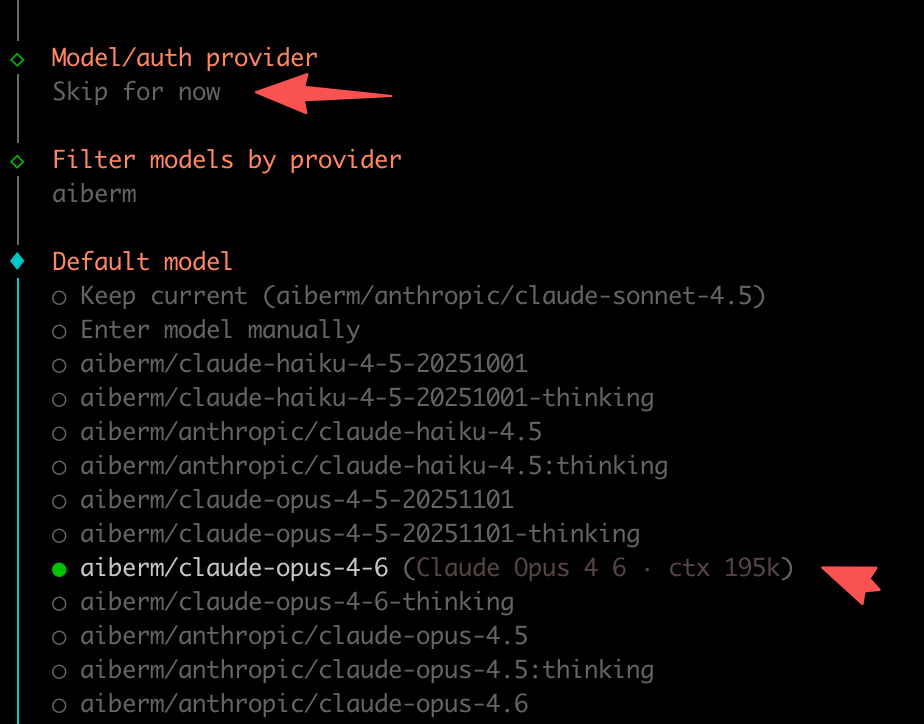
If you’re in a Docker container where installing plugins is inconvenient, you can directly refer to this configuration file and save it to
~/.openclaw/openclaw.json.
Available Models
The plugin dynamically loads models from Aiberm API. Here are some examples:
OpenAI GPT
aiberm/openai/gpt-5.2-codexaiberm/openai/gpt-5.2aiberm/openai/gpt-4.1aiberm/openai/gpt-4oaiberm/openai/gpt-4o-mini
Anthropic Claude
aiberm/anthropic/claude-opus-4.5aiberm/anthropic/claude-sonnet-4.5aiberm/anthropic/claude-haiku-4.5aiberm/anthropic/claude-sonnet-4.5:thinking
Google Gemini
aiberm/google/gemini-3-proaiberm/google/gemini-3-flashaiberm/google/gemini-2.5-pro
DeepSeek
aiberm/deepseek/deepseek-r1aiberm/deepseek/deepseek-v3.2
X.AI Grok
aiberm/x-ai/grok-4.1-fastaiberm/x-ai/grok-code-fast-1
Visit Aiberm Pricing for the complete and up-to-date list of available models.
Usage
After authentication, you can start using OpenClaw. For detailed usage, please refer to the OpenClaw Documentation.
List installed models:
openclaw models list | grep aibermEnvironment Variable
You can also set the API key via environment variable:
export AIBERM_API_KEY=sk-your-api-keyDynamic Model Loading
The openclaw-aiberm plugin features dynamic model loading:
- When the plugin loads, it fetches the latest model list from Aiberm API
- If the API is unavailable, the plugin falls back to a built-in model list
- During authentication, the latest models are fetched again
This means:
- New models are available immediately without plugin updates
- Deprecated models are automatically removed
- Model capabilities are always current
Troubleshooting
”No provider plugins found” Error
Make sure you have:
- Installed the plugin:
openclaw plugins install openclaw-aiberm - Enabled the plugin:
openclaw plugins enable openclaw-aiberm - Restarted the gateway:
openclaw gateway restart
401/403 Errors
- 401 error: API Key not set or invalid
- 403 error: Insufficient permissions or expired key
- Verify your API key at Aiberm Console
Plugin Not Loading
Check if the plugin is enabled:
openclaw plugins listIf not enabled, run:
openclaw plugins enable openclaw-aiberm
openclaw gateway restart