
Configurazione di DeepSeek Harness Desktop
DeepSeek Harness now ships a desktop app. It is an Electron shell around the same Web UI as dsh web, so you configure Aiberm the same way: add a custom OpenAI-compatible provider. After that, one Aiberm API key can reach Claude, GPT, Gemini, DeepSeek, Kimi, MiniMax, GLM, Grok, and the rest of the models on Aiberm.
Desktop is in public preview and still iterating. Download it from the official Harness or Download page. Model setup follows the same Configure models flow as the Web UI.
If you already use npx @deepseek-ai/dsh web, see DeepSeek Harness Setup for the CLI path. Desktop and Web share $DSH_HOME (default ~/.dsh), so a provider you add in one appears in the other.
What is DeepSeek Harness Desktop?
The desktop app can run in the background, edit local files, and keep long tasks going after you close the window (the Host keeps running). Official product copy: Work in the background, edit local files, and handle long, complex tasks with ease.
Official pages:
- Product: deepseek.com/en/harness
- Downloads: deepseek.com/en/download
- Source: github.com/deepseek-ai/deepseek-harness
Prerequisites
- macOS 13 or later on Apple silicon, or Windows x64
- An Aiberm account (Sign up)
- An Aiberm API key (Get your key)
You do not need a system Node.js install. Desktop bundles its own runtime.
Install the desktop app
- Open the official download page.
- Download the desktop app for your platform. Current official builds are macOS (Apple silicon, macOS 13+) and Windows (x64). Always take the installer from that page so the link stays current.
- Install and launch DeepSeek Harness.
Closing the window hides it; tasks keep running. On Windows, reopen from the tray. On macOS, click the Dock icon. Use Quit DeepSeek Harness when you want the Host to stop.
Optional: in the application menu, Manage dsh Command… can install a dsh CLI that uses the desktop runtime. Open a new terminal afterward and run dsh --version.
Configure Aiberm
Aiberm is not the built-in DeepSeek card. That card keeps the official DeepSeek endpoint. Add Aiberm as a custom provider.
Step 1: Open Settings → Models
In the desktop app, open Settings → Models.
Step 2: Add a custom provider
Choose Add a custom provider and fill in:
| Field | Value |
|---|---|
| Provider ID | aiberm (lowercase, permanent) |
| Display name | Aiberm |
| Base URL | https://aiberm.com/v1 |
| API protocol | openai-completions |
| API key | your Aiberm key from Console → API Tokens |
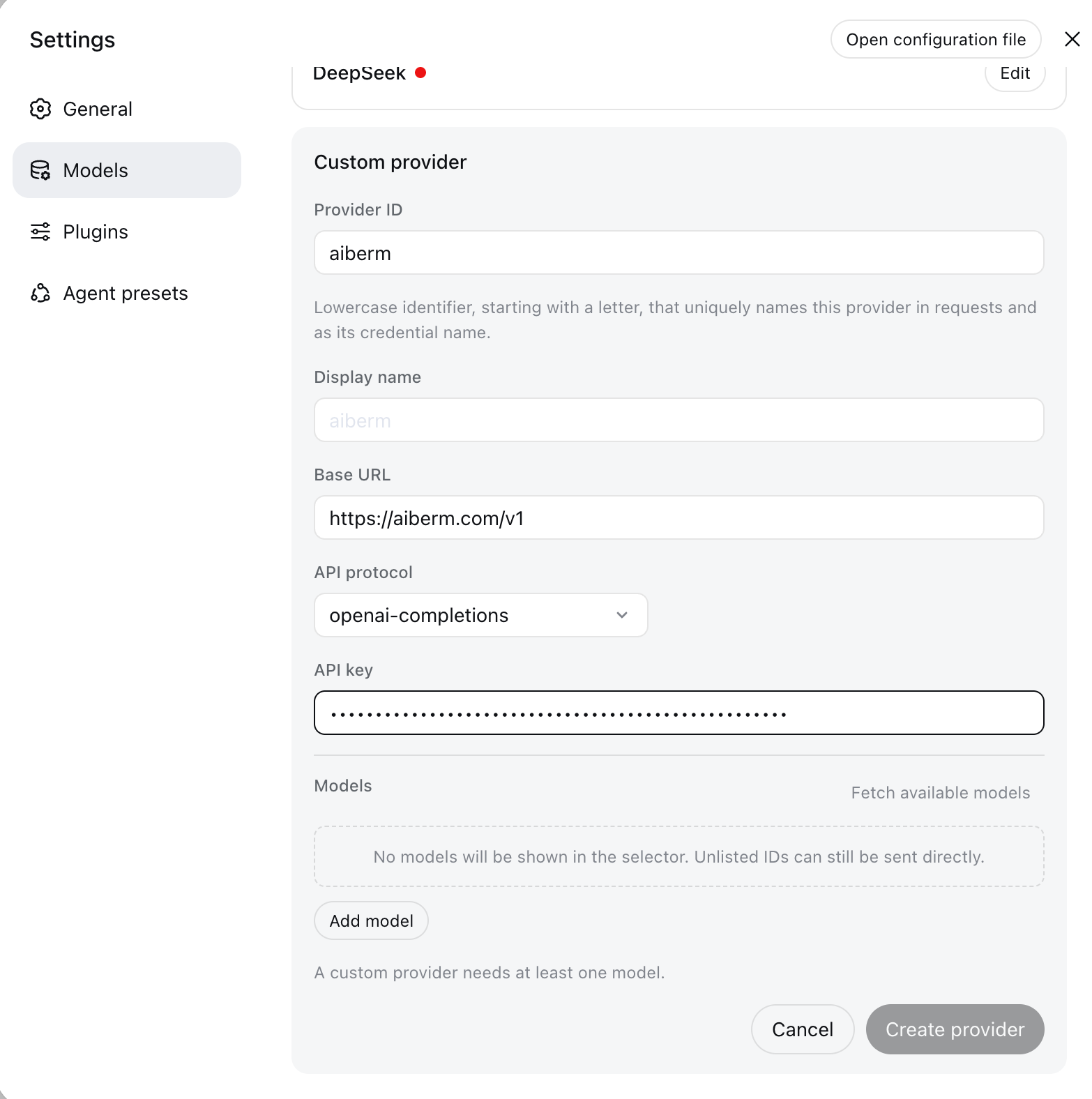
The Provider ID cannot be renamed later. Requests, saved sessions, the default model, and the stored credential all use it. To change it, add a new provider and delete the old one.
Step 3: Load or enter models
Under Model catalog, choose Fetch available models. Select the models you want, then save.
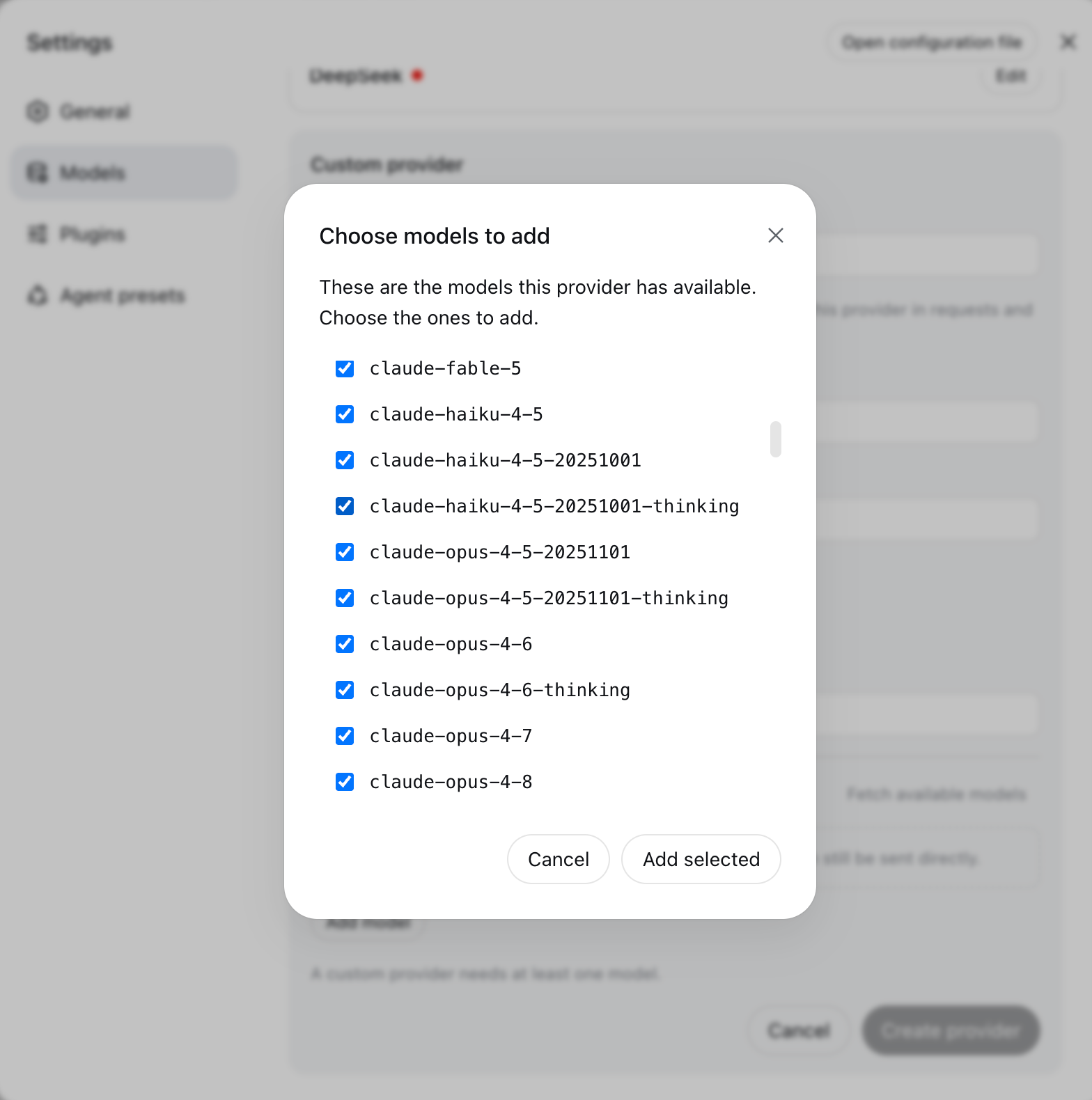
If discovery fails, enter model IDs by hand from the Models List. Examples: claude-sonnet-4-6, gpt-5.4, google/gemini-3-flash, deepseek/deepseek-v4-pro, grok-4.6.
The page never writes the API key into settings.yaml. The key is stored write-only in $DSH_HOME/.credentials.yaml.
Step 4: Select a model
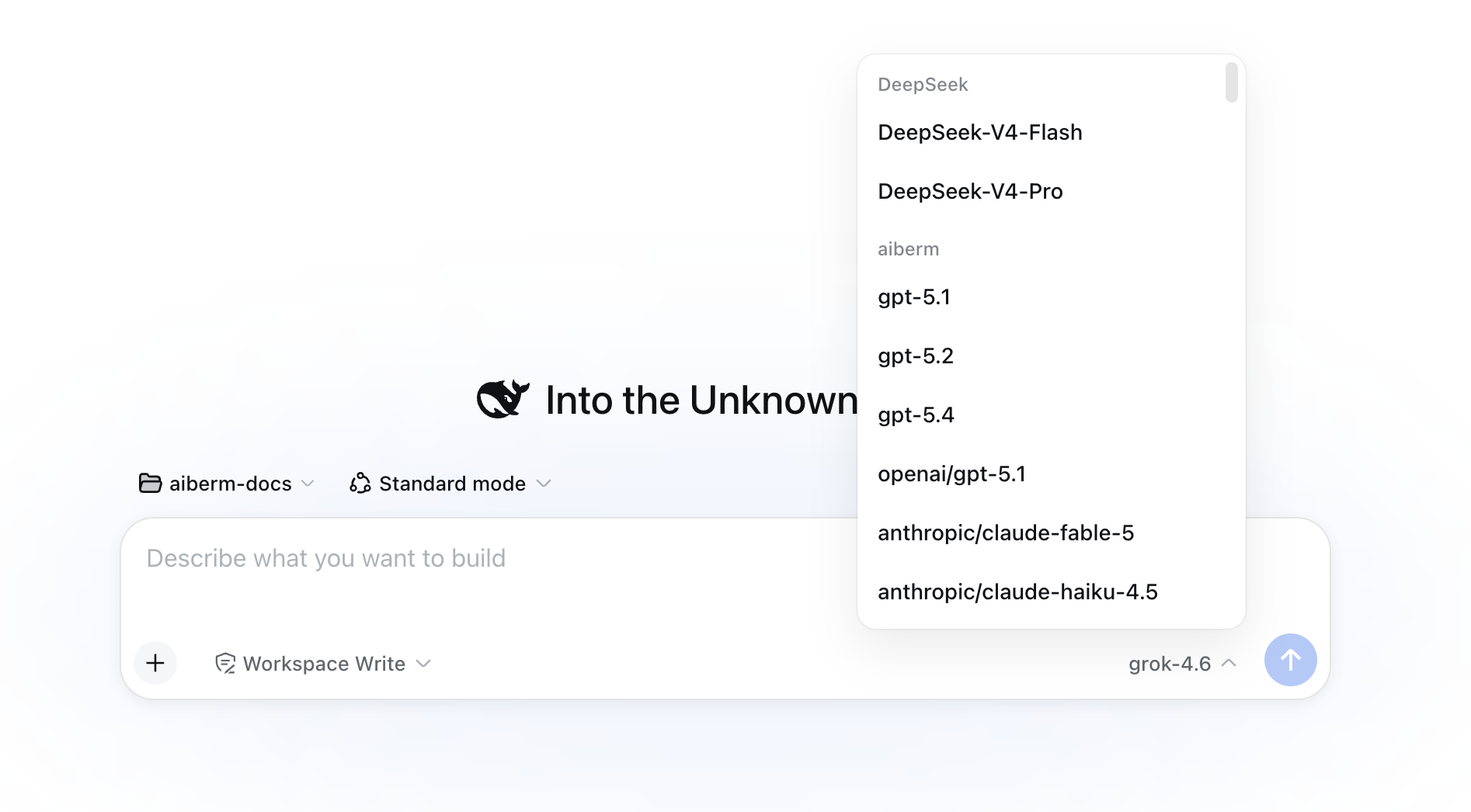
After saving, the composer model picker lists Aiberm separately from built-in DeepSeek models. Use the Aiberm group for Claude, GPT, Gemini, and the rest of the catalog.
Verify the setup
- Open a new session in the desktop app.
- Confirm the model picker lists Aiberm and your models.
- Send a short prompt such as
Hi.
If the reply succeeds, Desktop is calling Aiberm.
settings.yaml (optional)
Desktop reads the same $DSH_HOME/settings.yaml as the Web UI. You can declare the provider by hand instead of using the form:
llm-pi-ai:
  providers:
    aiberm:
      displayName: Aiberm
      apiKeyEnv: AIBERM_API_KEY
      api: openai-completions
      baseURL: https://aiberm.com/v1
      models:
        - id: claude-sonnet-4-6
        - id: gpt-5.4
        - id: google/gemini-3-flash
        - id: grok-4.6

agent-default-model:
  provider: aiberm
  model: claude-sonnet-4-6
Store the key in $DSH_HOME/.credentials.yaml:
AIBERM_API_KEY: sk-your-aiberm-api-keyDo not put the key in settings.yaml. Full field notes, vision input, and credential order are in DeepSeek Harness Setup.
Troubleshooting
MISSING_CREDENTIAL
Save the key on Settings → Models, or set AIBERM_API_KEY in the environment that launches Desktop.
401 when fetching models or chatting
- Check the key at Aiberm Console.
- Base URL must be
https://aiberm.com/v1(include/v1).
Requests still go to DeepSeek
You filled the built-in DeepSeek card. Add a custom provider with ID aiberm instead.
Config from the Web UI does not show up
Desktop and dsh web both use $DSH_HOME (usually ~/.dsh). If you launched CLI with a different DSH_HOME, the files will not match. Uninstalling the Windows app does not delete ~/.dsh.
Image refused before sending
Hand-entered models are text-only until you set input: [text, image] (or route defaultInput) in settings.yaml. See Vision models. Start a new session after changing it.