
OpenClaw 設定
了解如何設定 OpenClaw 以使用 Aiberm 的 API。本指南涵蓋 Windows、macOS 和 Linux 的安裝與設定。
什麼是 OpenClaw?
OpenClaw 是一個開源的 AI 代理平台,可以將 AI 助手直接帶到你的終端機和訊息應用中。它支援多種 LLM 供應商,並可以透過外掛進行擴充。
透過安裝 openclaw-aiberm 外掛,你可以使用一把 API Key 存取 Aiberm 上的所有模型(包括 GPT、Claude、Gemini、DeepSeek、Grok 等)。
前置條件
開始之前,請確認你具備:
安裝
步驟 1:安裝 OpenClaw
macOS 和 Linux:
curl -fsSL https://openclaw.ai/install.sh | bash或使用 npm:
npm i -g openclawWindows:
npm i -g openclaw驗證安裝:
openclaw --version步驟 2:安裝 Aiberm 外掛
安裝 Aiberm 供應商外掛:
openclaw plugins install openclaw-aiberm啟用外掛:
openclaw plugins enable openclaw-aiberm重要:啟用後需要重新啟動 gateway 才能生效:
openclaw gateway restart驗證
安裝並啟用外掛後,使用 Aiberm API Key 進行驗證:
openclaw models auth login --provider aiberm --set-default系統會提示你輸入 Aiberm API Key。在 https://aiberm.com/console/token 取得你的 API Key。
如果需要更換成其他模型,可以重新執行一次 openclaw onboard,在 Model/auth provider 中選擇 Skip for now,在 Filter models by provider 中選擇 aiberm,然後在模型列表中選擇你想切換的模型。
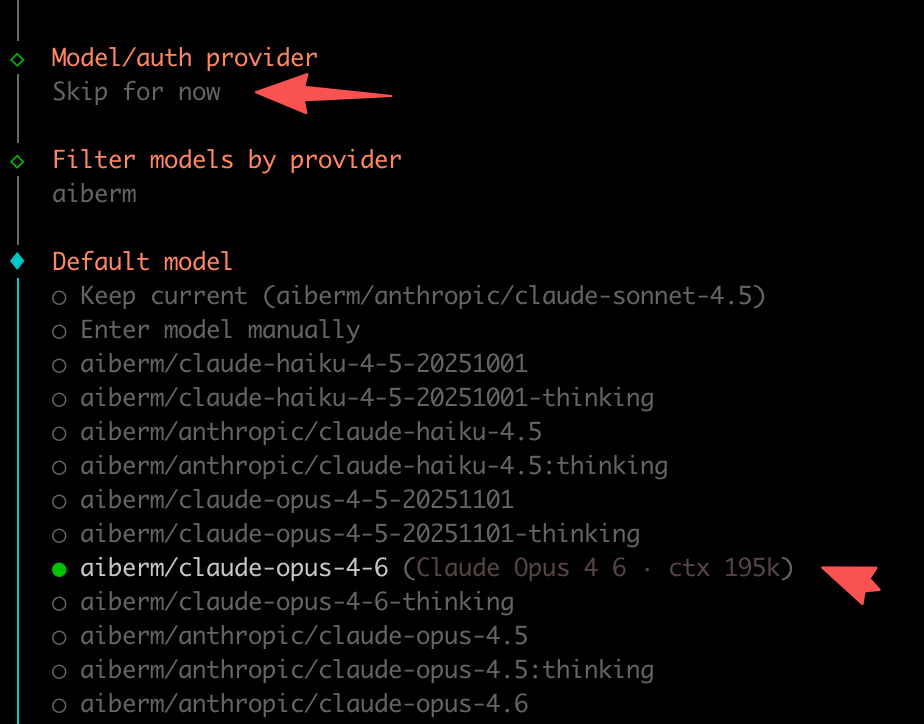
如果你在 docker 容器中不方便安裝外掛,可以直接參考這份設定檔案,儲存在
~/.openclaw/openclaw.json中。
可用模型
外掛會從 Aiberm API 動態載入模型。以下是一些範例:
OpenAI GPT
aiberm/openai/gpt-5.2-codexaiberm/openai/gpt-5.2aiberm/openai/gpt-4.1aiberm/openai/gpt-4oaiberm/openai/gpt-4o-mini
Anthropic Claude
aiberm/anthropic/claude-opus-4.5aiberm/anthropic/claude-sonnet-4.5aiberm/anthropic/claude-haiku-4.5aiberm/anthropic/claude-sonnet-4.5:thinking
Google Gemini
aiberm/google/gemini-3-proaiberm/google/gemini-3-flashaiberm/google/gemini-2.5-pro
DeepSeek
aiberm/deepseek/deepseek-r1aiberm/deepseek/deepseek-v3.2
X.AI Grok
aiberm/x-ai/grok-4.1-fastaiberm/x-ai/grok-code-fast-1
造訪 Aiberm 價格頁面 查看完整的模型列表。
使用方法
驗證成功後,即可開始使用 OpenClaw。具體使用方法請參考 OpenClaw 官方文件。
查看已安裝的模型:
openclaw models list | grep aiberm環境變數
也可以透過環境變數設定 API Key:
export AIBERM_API_KEY=sk-your-api-key動態模型載入
openclaw-aiberm 外掛支援動態模型載入:
- 外掛載入時,從 Aiberm API 取得最新模型列表
- 如果 API 無法使用,外掛會使用內建的模型列表
- 驗證時會再次取得最新模型
這表示:
- 新模型上線後無需更新外掛即可使用
- 下線的模型會自動移除
- 模型資訊始終保持最新
疑難排解
「No provider plugins found」錯誤
請確認你已經:
- 安裝了外掛:
openclaw plugins install openclaw-aiberm - 啟用了外掛:
openclaw plugins enable openclaw-aiberm - 重新啟動了 gateway:
openclaw gateway restart
401/403 錯誤
- 401 錯誤:API Key 未設定或無效
- 403 錯誤:權限不足或金鑰已過期
- 在 Aiberm 控制台 驗證你的 API Key
外掛未載入
檢查外掛是否已啟用:
openclaw plugins list如果未啟用,執行:
openclaw plugins enable openclaw-aiberm
openclaw gateway restart